Short sessions. Clear feedback. Steady progress.
Eduter organises preparation into focused bundles of exam-style questions. Each session shows learners what went well and what to try next, while parents and teachers follow along.
Four steps, every session.
Choose a bundle
A bundle is a set of questions on one topic. Each shows its subject, level and roughly how long it takes.
Answer the questions
Move through at your own pace, flag questions to revisit, and keep an eye on the timer when a bundle is timed.
Learn from feedback
See the score, review each answer, and read explanations that turn mistakes into understanding.
Track progress
Signed-in learners keep their results and can see how they are improving over time.
Build understanding, then test it.
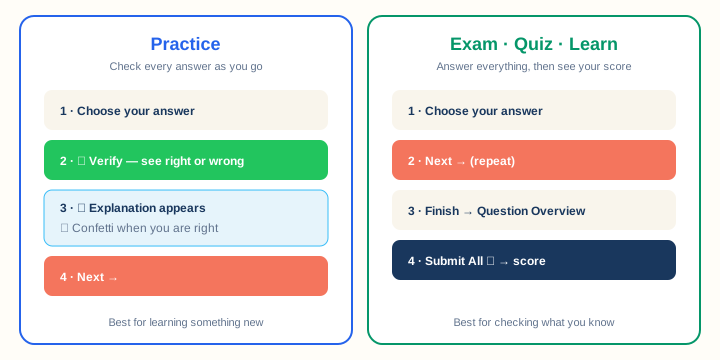
Practice mode
Check each answer straight away and read the explanation before moving on. Ideal for learning a new topic.
Exam mode
Answer everything first and see the score at the end, just like the real exam.
Stay involved without hovering.
Set up student accounts
Create a sign-in for each child from your own account. No child email address needed, and every learner’s results stay separate.
Plan the work
Set bundles with due dates and a number of tries. Learners see exactly what to do next on their plan.
Follow the results
Open a report for any submitted bundle, and share a progress link with a teacher or tutor that you can revoke at any time.
Want the details?
Our guides for students, parents, teachers and publishers walk through every screen, one step at a time.